

Prerequisites
- SQLFlow v2026.10.08 or later. Every result on this page was measured on that release unless it names another.
- ClickHouse Cloud, or self-hosted ClickHouse. This page was run against self-hosted 26.8.1 and Cloud 26.6.1. No minimum below those has been established.
- A Kafka broker the pipeline can reach, for the Kafka source used in the example. The WebSocket and webhook sources need no broker.
- Python 3 with the
confluent-kafkapackage (pip install confluent-kafka), only for the script in the example that publishes the sample data to Kafka. SQLFlow itself needs no Python. - Docker is the simplest install.
turbolytics/sql-flowis published multi-arch forlinux/amd64andlinux/arm64. SQLFlow can also be built from source; it needs Go, a C toolchain, andlibduckdbpresent at runtime.
Setup
SQLFlow connects with a single DSN. The scheme selects the protocol and whether TLS is used; the port defaults from the scheme if omitted.
The target table must already exist. SQLFlow does not create tables and does not evolve schemas: it names the columns in its
INSERT from the column names its SQL produces, so the columns your handler SQL emits must match the table’s column names. Use aliases in the SQL to rename.
Connect to ClickHouse Cloud
To connect to ClickHouse with HTTP(S) you need this information:
The details for your ClickHouse Cloud service are available in the ClickHouse Cloud console.
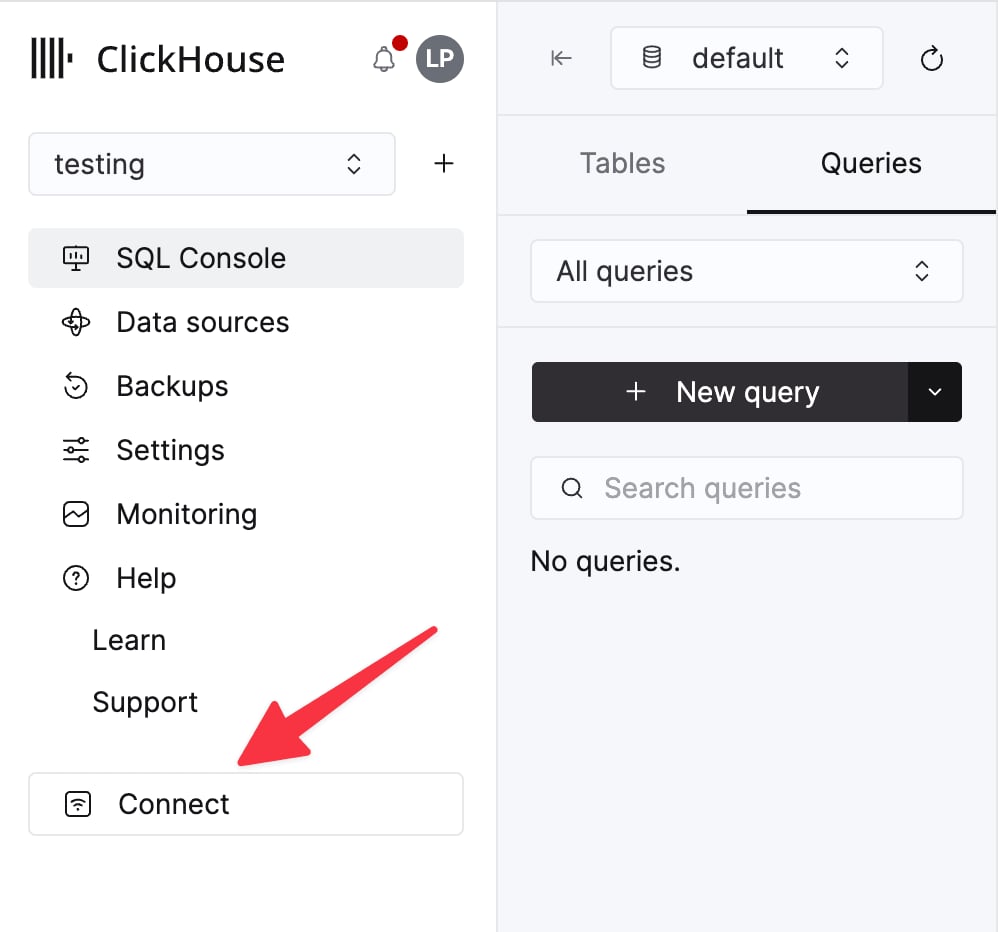
Select a service and click Connect:
curl command.
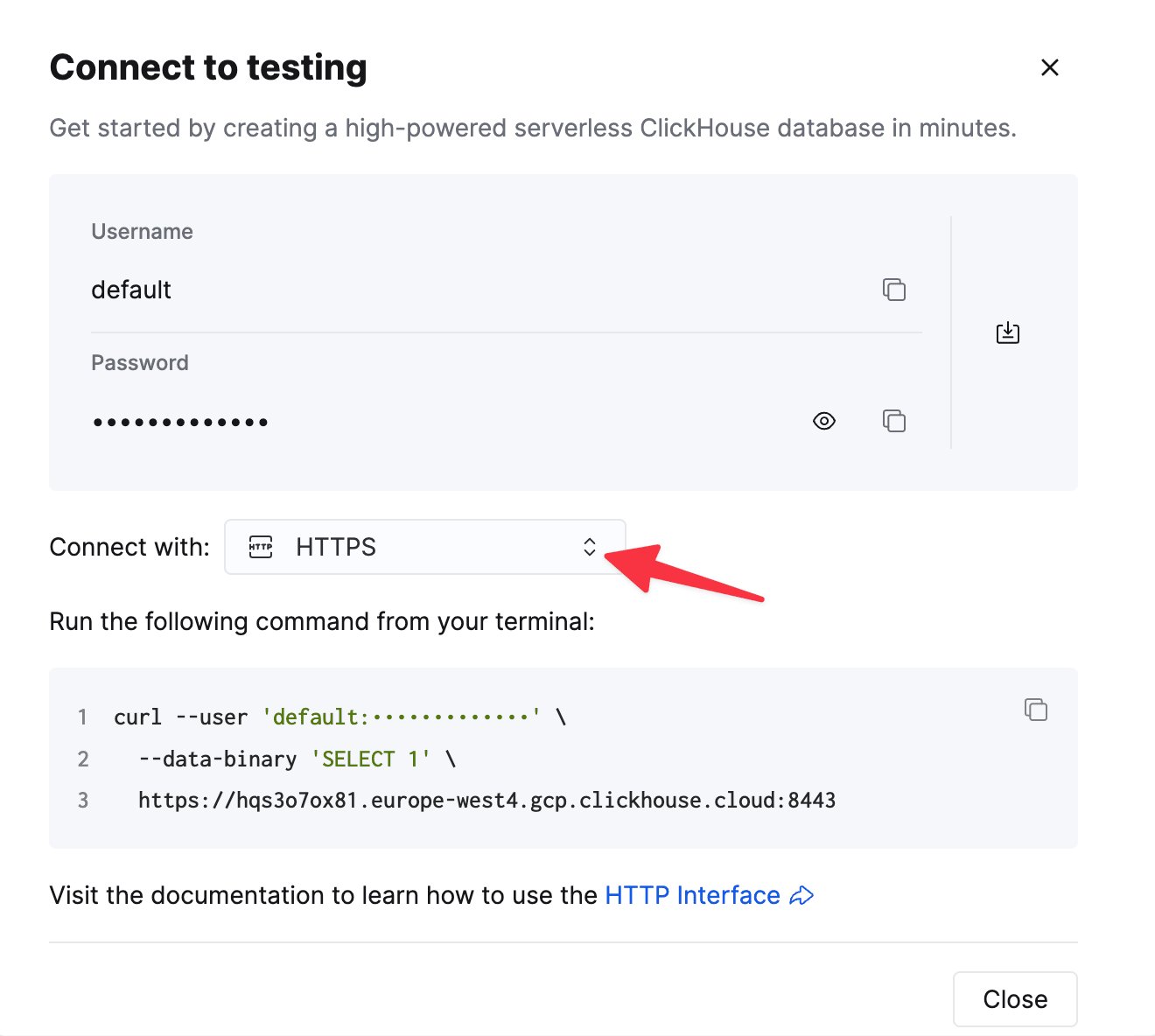
dsn field is a template:
Connect to self-hosted ClickHouse
Point the DSN at the HTTP interface, port 8123 by default:clickhouses:// exactly as for Cloud. For the native protocol use tcp:// (9000) or natives:// (9440).
When SQLFlow runs in Docker, localhost inside the container is the container itself, not your machine. Put SQLFlow and ClickHouse on the same Docker network and use the ClickHouse container’s name as the host.
Authentication
Username and password are carried in the DSN and, withclickhouses:// or natives://, are sent over TLS. The server certificate is verified against the system trust store; there is no option to skip verification.
- Special characters in the password. The DSN is parsed as a URL, so
/,#and?must be percent-encoded (%2F,%23,%3F); left raw they produce a confusinginvalid port ":p" after host.@and:are handled correctly either way. - Cloud IP access lists. If your service restricts source IPs, the address SQLFlow connects from has to be on the list.
- Not supported: mutual TLS / client certificates, and custom CA bundles. Use username and password.
Example: streaming the NYC taxi dataset from Kafka
This walks the NYC taxi sample dataset through Kafka into ClickHouse, transformed by SQLFlow on the way. It reproduces on Cloud or self-hosted; only the DSN changes.
- Create the target table
The same table the sample-dataset page defines:
- Publish the data to Kafka
The dataset is published as gzipped TSV. This step converts one file (about a million rows) to newline-delimited JSON and publishes it to a topic named nyc-taxi-trips.
Install the publisher’s dependency and download the file:
auto.create.topics.enable=false, where an uncreated topic fails the example before any row reaches ClickHouse:
kafka-topics, without the .sh.
Save the publisher as publish.py. Change bootstrap.servers if the broker is not on localhost:9092:
- Write the pipeline
Save this as taxi.yml. The handler SQL runs in DuckDB over each batch of JSON messages; the casts produce Arrow types that map onto the table’s ClickHouse types (see Type mapping).
batch_size is the number of messages per DuckDB batch and per ClickHouse INSERT. See Performance for why 20,000.
- Run it
--max-msgs stops after that many messages; leave it off to run continuously. Kafka offsets are committed only after each INSERT has been acknowledged by ClickHouse, and only up to the last message actually processed.
- Verify
SETTINGS select_sequential_consistency = 1 to the query if the total comes up short.
A second example: WebSocket source, no Kafka
The WebSocket source needs no broker, and this shows anArray(String) column being written and queried natively. It consumes the public Bluesky firehose.
bluesky.yml and run it. No SQLFLOW_KAFKA_BROKERS here: the source is the WebSocket, and the only variable the pipeline reads is the DSN.
--network as in the Kafka example if ClickHouse runs in Docker on the same machine. With the binary instead of the image:
Type mapping
SQLFlow hands each batch to ClickHouse as rows built from the Arrow table DuckDB produces, so what matters is the Arrow type each SQL column ends up with. Cast in the handler SQL to control it. Every row below is generated from the engine’s type matrix and proven by an integration test that writes the value, reads it back through the server, and compares. The matrix and the test live in the SQLFlow repository. A pairing in the table is proven. A pairing missing from it is untested, not refused: the refused ones are listed under Unsupported and fail the batch with a code. Parameterised column types are listed as the instance the test wrote.A
VARCHAR reaches a non-String column as text the column parses. The matrix proves each destination with a value already in that destination’s text form, not with one value for all of them. A UUID string does not become a DateTime. The forms tested:Prefer
CAST(ts AS TIMESTAMP) over passing timestamps as strings. When SQLFlow sends a VARCHAR to a DateTime column, the Go driver parses the string, not the server. It accepts exactly two shapes:'2026-09-01 12:00:00', which it reads as UTC. The server’s timezone and the column’s timezone do not change the instant stored. Measured against a server runningAsia/Tokyo: the row landed on2026-09-01 12:00:00 UTC, the same instant aDateTime('UTC')column received.'2026-09-01 12:00:00 +09:00', whose offset is applied. That row stores2026-09-01 03:00:00 UTC.
T separator or a Z suffix. '2026-09-01T12:00:00Z' is rejected with parsing time "2026-09-01T12:00:00Z" as "2006-01-02 15:04:05".This differs from writing the same literal in an INSERT statement yourself, where ClickHouse parses the string in the target column’s timezone, and a plain DateTime column uses the server timezone. Casting in the handler SQL sidesteps both sets of rules.If the field can be NULL, a DateTime column stores it as 1970-01-01 00:00:00. Use Nullable(DateTime), or coalesce(CAST(ts AS TIMESTAMP), now()::TIMESTAMP) in the handler SQL.Decimal columns accept the value as a string, not as a DOUBLE. CAST(amount AS VARCHAR) works; CAST(amount AS DOUBLE) fails the batch with converting float64 to Decimal(10, 2) is unsupported.Unsupported
These fail the batch withuser.sink.type_unsupported rather than reaching the table. Cast or flatten them in the handler SQL.
DECIMAL(p, s),HUGEINT,UHUGEINTTIME,TIMETZTIME_NSINTERVALDECIMAL(p, s)[],HUGEINT[]TIME[]STRUCT(...)[]INTEGER[3]STRUCT(...)MAP(K, V)UNION(...)ENUM
Known limits
-
Unsupported types: listed under Unsupported.
DECIMAL,STRUCT,MAP,TIMEandINTERVALare the ones a handler reaches for. Each fails the batch withuser.sink.type_unsupportedbefore any row is written. Flatten aSTRUCTorMAPinto scalar columns in the handler SQL, or serialise it withto_json()into aStringcolumn. Cast aDECIMALtoVARCHAR.Nestedcolumns were not tested. -
No table creation or schema evolution. The table must exist, and a column the handler emits that the table lacks fails the batch (see Troubleshooting). Columns the handler omits take the table’s
DEFAULT. -
A
NULLwritten to a non-Nullablecolumn is stored as the type’s zero value, not as the column’sDEFAULTexpression, and no error is raised. See Type mapping for the workaround. For anEnumwith no0member that value is not a member, and the row cannot be read back. See the warning under Type mapping. -
At-least-once delivery. Kafka offsets are committed after the
INSERTis acknowledged. A crash between the two replays the batch, so duplicates are possible.ReplacingMergeTreekeyed on something that identifies the row removes them eventually, on a background merge. Until that merge, an ordinary read sees both copies: measured on self-hosted 26.8.1, a replayed block read 4 rows, and 2 withFINAL. Query withFINALwhere a read must be exact now. Insert-time block deduplication drops a second copy only when the block is byte-identical. A replicated table, which every Cloud table is, does that by default, and a non-replicated one does it withnon_replicated_deduplication_window. A replay cuts its batches again from the committed offset, and a batch the flush interval cut short does not come back with the same boundaries. Treat insert-time deduplication as a partial measure, not a guarantee. -
Transient failures are retried. A refused, reset, or timed-out connection to ClickHouse is retried with exponential backoff under a deadline, configured by the sink’s
retryblock (max_attempts,initial_backoff_ms,max_backoff_ms,deadline_seconds). A rejectedINSERTis not retried once the server has seen it. A value the driver itself cannot encode, such as the ISO 8601 timestamp above, is not retried: it fails at once asuser.sink.encode_failed, and the process exits with code 10. The sink also dials ClickHouse once at startup, so an unreachable host fails before any message is consumed. -
One connection, one
INSERTper batch. There is no parallel writer. Throughput is governed bybatch_size; see below. -
Streaming aggregation (tumbling windows) is supported. A window closes on an event-time watermark the engine asserts, never on wall clock. A record’s event time is the payload field the source’s
event_timenames, or the Kafka timestamp when it names none. The handler cuts the bucket astime_bucket(INTERVAL '<size>', event_time). A replay running behind real time therefore publishes each bucket once, whole: 1,000 events in one past one-minute bucket, read in ten batches of 100, published one row of 1,000. Setallowed_lateness_secondsabove zero and a late row republishes its bucket as a whole value, so the target must then replace the row by key, with aReplacingMergeTreeread throughFINAL. See Tumbling windows in the README.
Performance
Measured with the example above: one million 17-column rows, one SQLFlow process, Kafka co-located with SQLFlow, two runs per row.
The Cloud figure is the network between the machine and the service, not SQLFlow. Over the same link in the same hour, the previous release, v2026.09.17.1, ran 12,500 and 12,900 rows a second, and the same pipeline against a self-hosted server on one Docker network runs four times as fast. Run SQLFlow near the service, same region and ideally same VPC, for numbers closer to the self-hosted figure.
batch_size is the lever on a nearby target, measured on the same Docker network:
Below about 20,000 rows per batch, per-
INSERT overhead dominates; above it there is little further to gain, and memory per batch grows. 20,000 is a good default for rows of this width; verify against your own.
Troubleshooting
connection reset by peer immediately, with ...:8443?... in the message
The DSN uses clickhouse:// (plain HTTP) against a TLS port. The full error looks like failed to query server hello: … Post "http://…:8443?…": … connection reset by peer. Change the scheme to clickhouses://.
[HTTP 401] code: 194 … Authentication failed: password is incorrect, or there is no user with such name
The credentials in the DSN are wrong, or a special character in the password was not URL-encoded. On Cloud, the default user’s password is shown once at service creation and can be reset from the console. If the password is right, check the service’s IP access list.
column <name> is not present in the table <table>
The full error starts with [system.sink.write_failed] clickhouse sink: prepare batch:. The handler SQL produced a column the target table does not have. SQLFlow inserts by column name, so either alias the column in the SQL to match the table, drop it from the SELECT, or add it to the table.
clickhouse sink: column "<name>": unsupported arrow type <type>
The column’s Arrow type has no ClickHouse mapping, such as a struct or a map value. Cast or flatten in the handler SQL; see Type mapping.
converting float64 to Decimal(10, 2) is unsupported
A DOUBLE was sent to a Decimal column. Cast to a string instead: CAST(amount AS VARCHAR) AS amount. The driver parses the decimal text exactly, with no floating-point rounding.
parsing time "…" as "2006-01-02 15:04:05"
A VARCHAR timestamp reached a DateTime column in a shape the driver does not accept. It takes '2006-01-02 15:04:05' and the same with a trailing offset, and nothing else. ISO 8601 with a T separator or a Z suffix fails. Cast in the handler SQL with CAST(ts AS TIMESTAMP), or reformat the string. See Type mapping.
The error carries the code user.sink.encode_failed, and the process exits with code 10. It is not retried, because the value would fail every attempt.
The pipeline runs but rows never appear
Check the batching. A batch is executed and inserted whenbatch_size messages have arrived, or when flush_interval_seconds elapses with a partial batch waiting. Whichever comes first wins. flush_interval_seconds defaults to 30, so a partial batch on a low-volume topic waits up to 30 seconds. For faster inserts on a quiet topic, lower flush_interval_seconds, which takes any whole number of seconds, or lower batch_size. With --max-msgs, the final partial batch is inserted on exit.
Further reading
- SQLFlow on GitHub: configuration reference, all sources and sinks, error policies, windowing.
- SQLFlow documentation: tutorials, including a longer ClickHouse walkthrough.